 icon in
 Viewing Payroll History
The Payroll History form summarizes the history of payrolls for one calendar year.
To view the payroll history:
| 1. | Select the Year. |
| 2. | Select one or more batch types to view; the default is to show All Types. |
| 3. | Select the information you want to view in the Line Chart. The information displays. For example: |
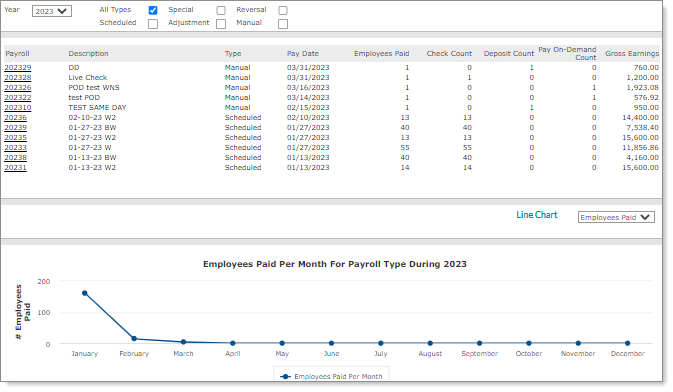
Note: The Pay On-Demand Count column indicates the number of checks paid in payrolls that used the Pay On-Demand feature (that is, the payroll type is Manual and the vouchers have the D*PD status). See Processing Pay On-Demand Payments.
| 4. | Click a Payroll number to view the Payroll Summary. See Listing Payments in a Payroll. |
